

DSH Launcher
☆ 10Lightweight Windows launcher for DeepSeek Harness: silent autostart at logon + a minimal WebView2 window instead of a full browser
Get this plugin
Review the source, then continue to the publisher.
About this plugin
Source snapshot 8/13/2026dsh-launcher


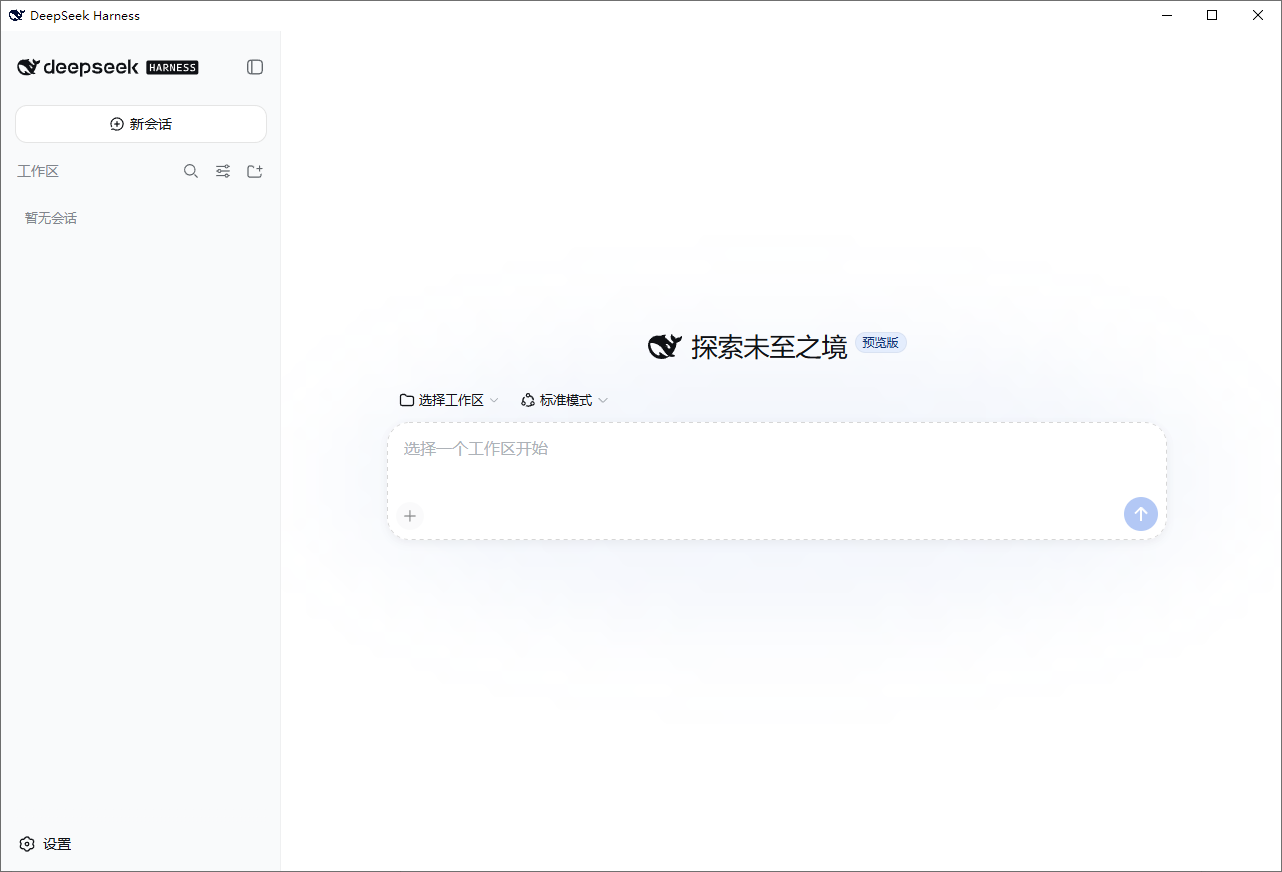
DeepSeek Harness 的 Windows 轻量启动器:开机自启 + 独立小窗口,双击即用,不用敲命令。
安装
方式一:MSI 安装包(推荐) — 下载 dsh-launcher-<版本>.msi 双击安装,向导里可勾选是否开机自启;卸载:设置 → 应用 → dsh-launcher → 卸载。
方式二:便携版 ZIP — 下载 dsh-launcher-windows.zip,解压后双击 DshWeb.exe;删文件夹即卸载(自启/快捷方式用 uninstall-autostart.cmd 清理)。
需要 Node.js 18+。dsh 不必全局安装:启动器会自动用
npx -y @deepseek-ai/dsh拉起服务。
特性
- 🚀 开机自启:登录后静默启动 dsh 服务,不弹窗口
- 🪟 轻量窗口:WebView2 独立窗口(约 50–150MB,关窗即释放),替代完整浏览器
- 🔌 自动拉起:服务没开时自动启动并等待就绪
- 📋 日志:
%USERPROFILE%\.dsh-web.log
常见问题
Q:双击没反应?
查看日志 %USERPROFILE%\.dsh-web.log,确认 Node.js 已安装。
Q:提示缺少 .NET Desktop Runtime?
执行 winget install Microsoft.DotNet.DesktopRuntime.10 后重试。
Q:必须先手动跑 npx @deepseek-ai/dsh web 才有窗口?
旧版问题,v0.1.2+ 已修复:dsh 不在 PATH 时自动回退 npx -y @deepseek-ai/dsh,无需全局安装。
更多
- 技术实现 / 安全 / 发版策略 / 从源码构建:docs/DETAILS.md
- 更新日志:CHANGELOG.md
免责声明
本仓库是独立的第三方工具,与 DeepSeek / DeepSeek AI 官方无关。DeepSeek Harness(dsh)是官方项目(MIT)。窗口图标使用了 DeepSeek 品牌标识,版权归 DeepSeek 所有,仅作个人本地使用。
许可证
MIT © dsh-launcher contributors
English
A lightweight Windows launcher for DeepSeek Harness: autostart at logon + a small WebView2 window instead of a full browser.
Install
Option 1: MSI installer (recommended) — download dsh-launcher-<version>.msi and double-click it; the wizard lets you choose autostart. Uninstall: Settings → Apps → dsh-launcher.
Option 2: portable ZIP — download dsh-launcher-windows.zip, extract and run DshWeb.exe; delete the folder to uninstall (use uninstall-autostart.cmd to remove autostart/shortcuts).
Requires Node.js 18+. A global dsh install is optional — the launcher falls back to
npx -y @deepseek-ai/dshautomatically.
Features
- 🚀 Autostart — the dsh service starts silently at logon
- 🪟 Lightweight window — WebView2 (~50–150MB, freed on close) instead of a full browser
- 🔌 Auto-launch — starts the service if it is not running and waits until ready
- 📋 Logging —
%USERPROFILE%\.dsh-web.log
FAQ
Q: Nothing happens when I double-click it?
Check %USERPROFILE%\.dsh-web.log and make sure Node.js is installed.
Q: It asks for .NET Desktop Runtime?
Run winget install Microsoft.DotNet.DesktopRuntime.10 and retry.
Q: I had to run npx @deepseek-ai/dsh web manually first?
Fixed in v0.1.2+: the launcher falls back to npx -y @deepseek-ai/dsh when dsh is not on PATH — no global install needed.
More
- Implementation / Security / Release policy / Building from source: docs/DETAILS.md
- Changelog: CHANGELOG.md
Disclaimer & License
Independent third-party tool, not affiliated with DeepSeek / DeepSeek AI. MIT © dsh-launcher contributors.
Related DeepSeek Harness Plugins
Browse Browser →
本地私有、开源的跨平台 AI 内容发现 Agent:先理解你,再主动从 B站、小红书、抖音、YouTube、X、知乎、Reddit、微博等平台与开放 Web 寻找内容。 | Local-first open-source cross-platform AI content discovery agent: understands you, then proactively finds content across Bilibili, Xiaohongshu, Douyin, YouTube, X, Zhihu, Reddit, Weibo and the open web.

Plugin and skin collection for DeepSeek Harness (DSH) Web UI - task board, git graph, right-side panel, remote mobile UI, pet, live token stats, and skin center.

让纯文本模型更好地做视觉任务的DeepSeek Harness插件:带意图的图片问答、长截图 OCR、UI 还原等|DeepSeek Harness-native integration for agent-vision-toolkit: image Q&A, long-screenshot OCR, UI restoration, grounding, pixel diff, Artifacts, and Web UI.

是兄弟就来蹬我!DSH Web UI 广告:2005 年中文站点风格的侧栏广告 / 对话内信息流 / 角落弹窗 + 一个真实热区比视觉小得多的关闭叉。素材全虚构,域名打码。