

OpenFlowFrames
☆ 2DeepSeek Harness plugin exposing OpenFlowFrames video frame interpolation (RIFE) as agent tools
Get this plugin
Review the source, then continue to the publisher.
dsh plugin add github:ZeroHackz/OpenFlowFrames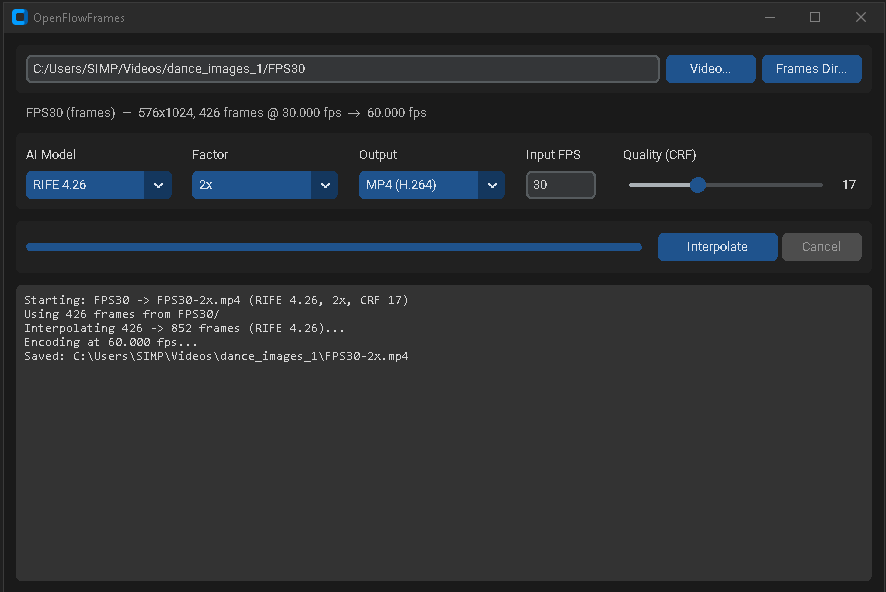
About this plugin
Source snapshot 8/13/2026OpenFlowFrames - Video Frame Interpolation for Windows
This project is a fork of the original Flowframes by n00mkrad. Huge thanks to him for creating and maintaining the powerful core of this application!
This fork is a lean, fully free and open reimagining: a modern Python GUI around the latest RIFE models — no Patreon tiers, no paid builds, no legacy codebase.
Screenshot
Main interface: pick a video or a folder of frames, choose a model and factor, interpolate.
✨ Features
- Latest RIFE Models: RIFE 4.9 through 4.26 bundled in the repo — no external model server, fully self-contained.
- Any GPU: Runs on AMD, Intel, and NVIDIA via
rife-ncnn-vulkan— no CUDA or PyTorch required. - Modern GUI: A clean CustomTkinter dark-mode interface — no install needed beyond Python.
- Video or Frame-Folder Input: Interpolate a video file, or a directory of PNG/JPG/WebP frames with a custom input framerate.
- MP4 or PNG Output: Encode to H.264 MP4 (audio preserved) or export the interpolated frames as a PNG sequence.
- Robust Frame Handling: Mixed resolutions and alpha/16-bit PNGs (common in AI-generated frames) are normalized automatically.
- Portable Windows Executable: Build a self-contained portable app with one script — no Python needed on the target machine.
- No Monetization: Fully free; no Patreon/PayPal integrations.
💻 How to Use (Easy Way)
Python GUI (recommended):
- Clone this repository:
git clone https://github.com/ZeroHackz/OpenFlowFrames.git - Double-click
launcher-gui.bat— it sets up a virtual environment on first run and launches the GUI.
Portable build:
Run build-portable.bat. The result in dist/ is fully self-contained:
dist/
  OpenFlowFramesPortable.exe
  packages/av/           (ffmpeg)
  packages/rife-ncnn/    (interpolator + bundled RIFE models)
Copy the dist folder anywhere and double-click the exe.
How It Works
ffprobereads the input framerate and frame count (or you provide the FPS for a frame folder).ffmpegextracts frames (skipped for frame-folder input).rife-ncnn-vulkaninterpolates toframes × factor.ffmpegencodes H.264 at the multiplied framerate, copying the original audio — or the frames are exported as PNGs.
⌨️ Headless CLI
The same engine runs without the GUI — from scripts, CI, or agents:
python cli.py --probe --input C:\clips\dance.mp4
python cli.py --input C:\clips\dance.mp4 --factor 2 --model "RIFE 4.9" --output out.mp4
python cli.py --input C:\clips\frames --fps 24 --factor 4 --out-mode png --output out_frames
🤖 DeepSeek Harness Plugin
This repository is also a DeepSeek Harness (dsh) plugin bundle — install it into a dsh profile and an agent can interpolate video directly through two tools:
flowframes_probe— inspect a video or frame directory (resolution, fps, frame count, audio).flowframes_interpolate— run RIFE interpolation headless (MP4 with audio, or PNG frames). Works on CPU or any GPU — AMD, Intel, or NVIDIA, no CUDA needed.
dsh plugin add github:ZeroHackz/OpenFlowFrames
Requirements on the machine running dsh: Python 3.10+ (or set OPENFLOWFRAMES_PYTHON). The bundled packages/rife-ncnn model files ship with the repo, so no model downloads are needed.
Example prompts for the agent
Interpolate E:\clips\dance.mp4 to 60fps with RIFE 4.9 and save it as dance-60fps.mp4This folder of AI-generated frames is at 24fps — make a smooth 4x version, then export it as an MP4Probe every video in E:\clips and list their fps and frame countsConvert this 24fps clip to 120fps slow-motion footage and matte out the foreground afterwards(pairs with the GUI-SAM2Matting plugin)
Credits
- Flowframes by n00mkrad — the original application this fork is based on
- RIFE by hzwer
- rife-ncnn-vulkan by nihui
- FFmpeg
Related DeepSeek Harness Plugins
Browse Developer Tools →
一个侧边栏的完整工作台,支持三方拓展注册新Tab页面,内置文件渲染编辑/终端/Git/子代理

DSH Web 鲸鱼娘皮肤系列(深海女仆工坊 maid-atelier)——CC BY-NC-SA 4.0

Open DeepSeek Harness workspace directories in VS Code directly from the web GUI.

Obsidian 零成本同步:iPhone ↔ Mac,GitHub 自动备份。本地优先 + 长期积累。|Local First. Zero-cost Obsidian sync across iPhone, Mac & GitHub. Let knowledge grow over time.