

DSH Custom Tool
☆ 17Create and manage sandboxed JavaScript tools for DeepSeek Harness with a Monaco editor and model-driven tool lifecycle.
Get this plugin
Review the source, then continue to the publisher.
dsh plugin add dsh-custom-tool@latest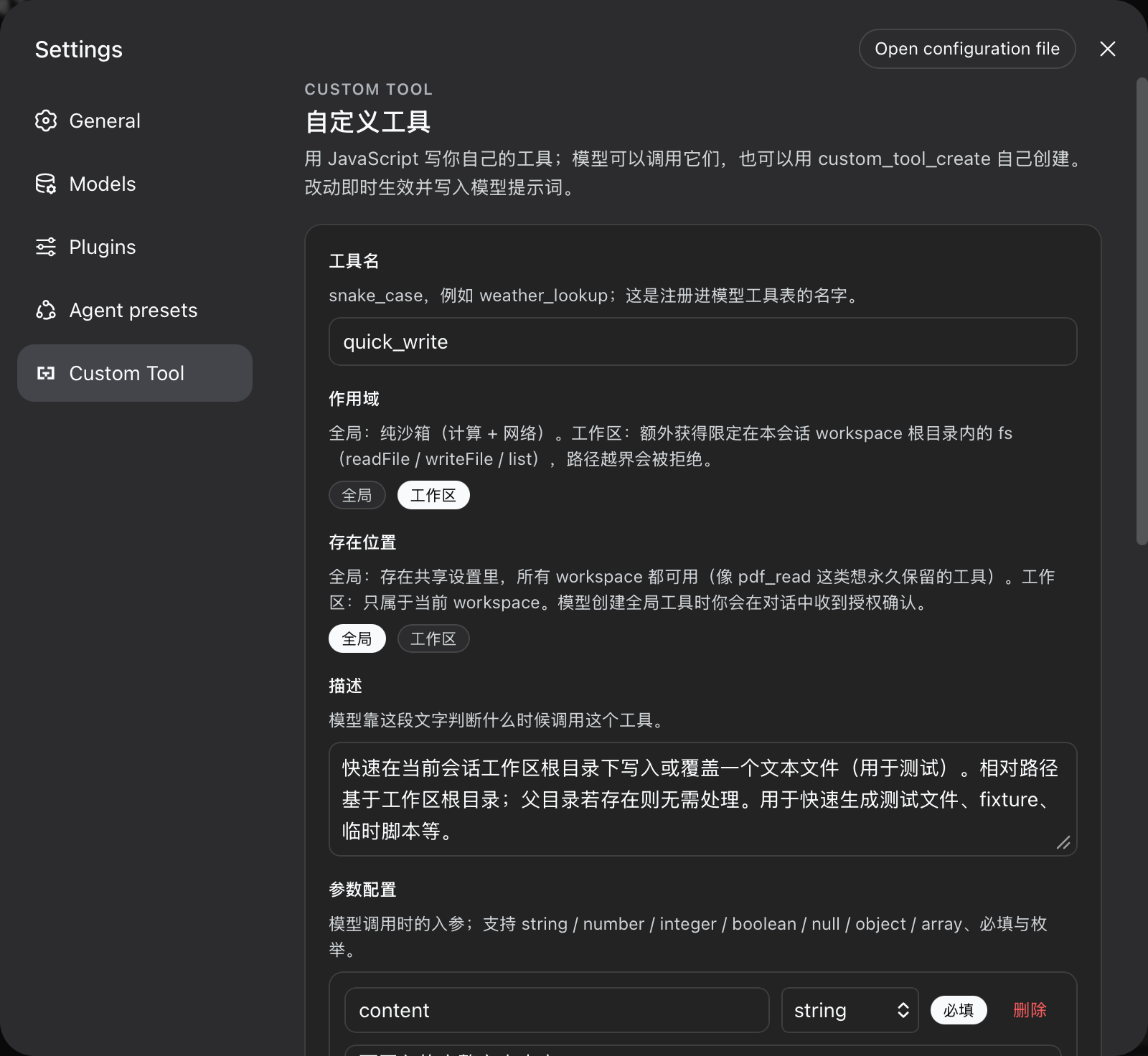
About this plugin
Source snapshot 8/13/2026dsh-custom-tool
Custom tools for the DeepSeek Harness: users author their own JavaScript tools in the settings UI with a Monaco (VS Code) editor and TypeScript intellisense, and the model grows and prunes the same toolset itself through custom_tool_create / custom_tool_remove / custom_tools_list. Every tool is durable, hot-registered, and written into the model prompt on the next step.
Problems it solves
- Users cannot extend their agent: before this plugin, adding a capability meant shipping a harness package. Now a tool is a form in the settings UI — name, description, parameters, code — saved live and callable by the model immediately.
- The model cannot grow itself:
custom_tool_createlets the model persist tools mid-session (hot-registered, visible on its next step), with the same validation gate the UI uses — the model cannot persist anything the settings UI would refuse. - Untrusted code runs in-process: every call executes in a fresh worker thread inside a
node:vmrealm with an explicit allowlist and hard budgets, instead ofevalin the agent process.
Features
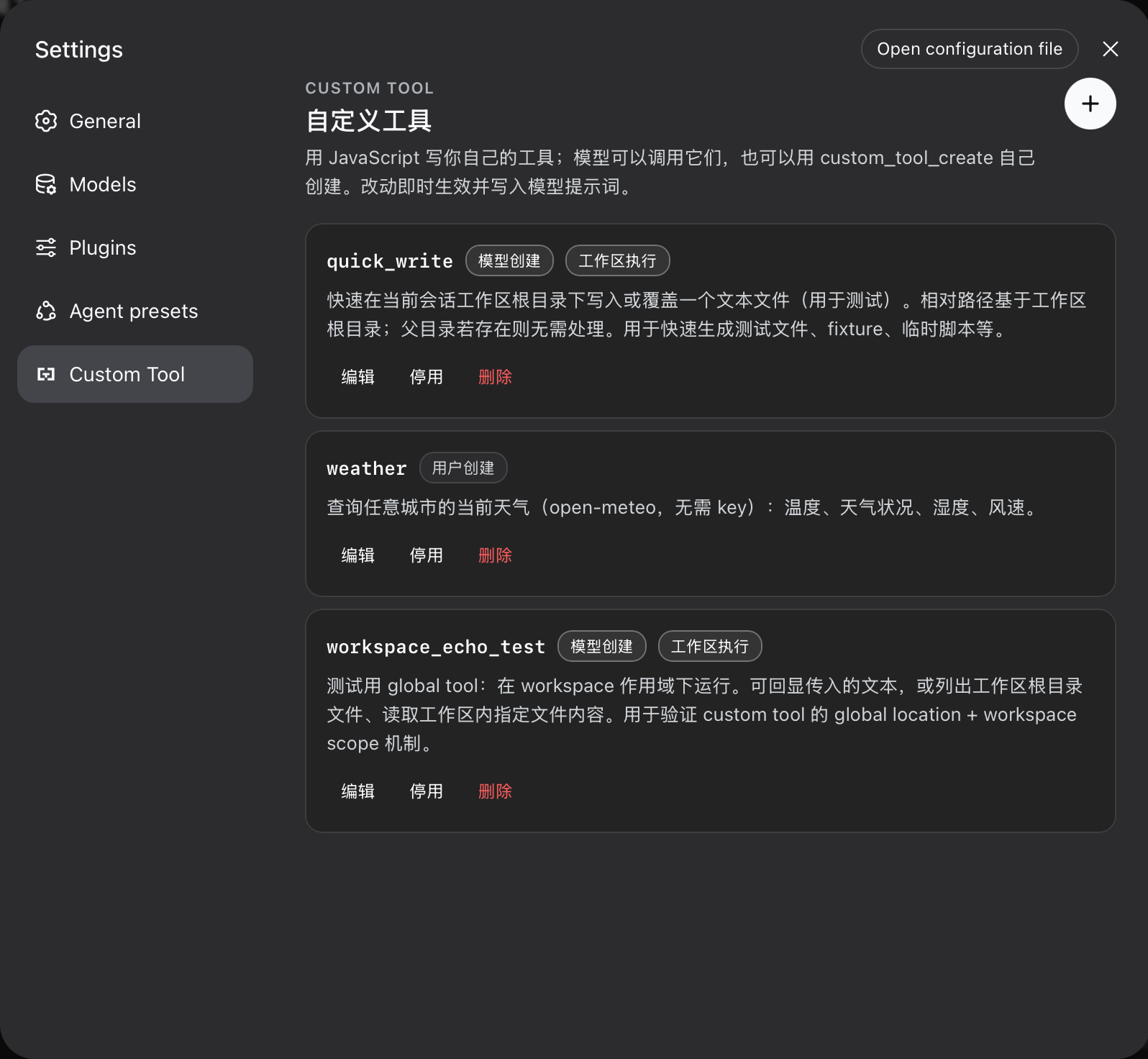
- Settings UI (
Custom Toolsection, own nav glyph): list, create, edit, enable/disable, delete. Model-created and workspace-scoped tools are badged. Every string follows the harness locale (Chinese / English) and switches with the language preference. - Monaco editor: VS Code engine + TypeScript language service;
argstyped from the parameter schema,env/sandbox globals declared, completions and diagnostics live. Editor and TS workers are bundled inline — the client bundle is a single file. - Durable store: tools live in the
custom-toolssettings namespace (schema defaults, composition base, user document — the ordinary settings layering). Edits apply live; restart restores them. - Live registration: enabled tools register into
ctx.toolsthe moment the settings write commits; disabled/removed tools unregister immediately. The harness assembles tool schemas into the system prompt automatically. - Model self-service:
custom_tool_create(upsert by name),custom_tools_list, andcustom_tool_removeshare the UI's validation gate and the ownership rules below.
Tool scopes and permission boundaries
Every tool declares one of two execution scopes. The boundary is the core security contract of this plugin:
global (default) | workspace | |
|---|---|---|
| Purpose | pure computation, external data, workflows | recurring file tasks inside the session workspace |
fetch (network) | per allowNetwork config | per allowNetwork config |
console, timers, TextEncoder, URL, … | yes | yes |
fs capability | no | readFile / writeFile / list, confined to the session workspace root |
require / import / process | never | never |
Confinement rules for the workspace scope
- The root is the session workspace directory (the initiating agent's
cwd), resolved at call time. - Relative paths resolve from the root; absolute paths must stay inside it; any path that escapes the root is rejected with an explicit error.
- Outside a session (no initiator context) a workspace tool fails with
no workspace rootrather than running without a boundary. - Confinement is lexical (
resolve+ prefix check). A symlink inside the workspace can still point out of it — workspace scope is trusted code, not a sandbox against a malicious host. The liveness budgets below apply to both scopes.
Storage locations
Every tool also declares where it EXISTS:
location: 'global'— stored in the shared settings namespace; available in every workspace until removed.location: 'workspace'— stored in a per-workspace file under<dsh home>/workspace-tools/, keyed by the canonical workspace root; visible only to sessions of that workspace (registered into each matching agent's own tool scope).
The two dimensions combine freely: a global-location tool with workspace scope (a durable file task the user keeps everywhere, like a PDF reader) runs its fs on whichever workspace calls it.
Ownership and authorization rules for the model
- The model may create, list, and remove model-created tools (
source: model). - Creating a global-location tool requires the user's explicit approval:
custom_tool_createraises a harness approval request (GUI prompt); a declined or unavailable answer fails the creation closed. Workspace-location tools are autonomous. - The model may not remove user-created tools (
source: user);custom_tool_removerefuses them and the system-prompt guidance says to ask the user to delete them in the settings UI. - The settings UI manages everything: both sources, both scopes, both locations, enable/disable, delete.
Execution budgets (both scopes)
- One worker thread per call; the worker is terminated on timeout, abort, or completion.
- Wall-clock deadline (
timeoutMs), heap cap (memoryLimitMb), result text bound (maxResultChars), code size bound (maxCodeBytes), stored-tool cap (maxTools).
Install
dsh plugin --profile web add https://github.com/omdsh-dev/dsh-custom-tool/archive/refs/heads/main.tar.gz
dsh web   # restart the server to pick the plugin up
The package declares dsh.bundle.patch (mounts the host plugin) and dsh.client (serves the browser half at /plugins/dsh-custom-tool/client.js). lib/ is committed, so the GitHub tarball installs without a build step.
Harness requirement: the settings namespace is exposed to web configuration clients through the WEB_SETTINGS_NAMESPACES allowlist in packages/host/apiproxy/src/api-proxy.ts; the string 'custom-tools' must be present there (the upstream harness commit d6ea05b5 adds it). Without it the UI renders but saves are silently refused (settings-not-exposed).
Tool code contract
The code field is the body of an async function async (args, env) => value:
// args is typed from the parameter JSON Schema you declared.
const url = `https://api.example.com/weather?city=${encodeURIComponent(args.city)}`
const response = await fetch(url)
if (!response.ok) throw new Error(`upstream returned ${response.status}`)
return await response.json()
- Return a JSON value (string, number, boolean, null, array, or plain object);
undefinedor a non-JSON value fails the call. - Parameters: object-rooted JSON Schema in the harness subset —
type,properties,required,items,enum,const,oneOf,additionalProperties,description,title,default,examples. - Globals:
fetch(blocked whenallowNetwork: false),console,TextEncoder/TextDecoder,URL/URLSearchParams,atob/btoa,structuredClone,AbortController,setTimeout/setInterval+ clears.envis{ tool, scope }. Workspace scope addsfs.
Configuration
All tunables are cordis.yml config fields of the dsh-custom-tool entry:
| Field | Default | Meaning |
|---|---|---|
timeoutMs | 30000 | wall-clock budget per call |
memoryLimitMb | 128 | worker old-generation heap cap per call |
maxResultChars | 16000 | rendered result text budget |
maxCodeBytes | 65536 | UTF-8 byte budget per tool body |
maxTools | 100 | stored-tool cap |
allowNetwork | true | whether tool bodies may call fetch |
Development
pnpm install        # links the sibling dsh checkout for types and tests
pnpm run build      # worker bundles -> inline sources -> declarations -> bundles
pnpm run test       # builds workers first (pretest), then vitest
pnpm run typecheck
pnpm run lint
pnpm run check      # typecheck + lint + test + build
Node-env tests alias @deepseek-ai/dsh-client-runtime/client to source and monaco-editor to a mock (see vitest.config.ts).
Known Limitations and Deferred Work
- Custom tool names cannot shadow tools owned by other packages; a collision surfaces as a per-tool registration failure in
custom_tools_list. - Workspace confinement is lexical, not symlink-proof (see the scope table).
- No per-tool test-run button in the UI yet; tools are exercised through model calls or a headless run.
Related DeepSeek Harness Plugins
Browse Security →
Open-source sandboxes for AI agents, untrusted code execution, and durable services.

a coding Agent from pi. sub-agents, hashline edits, and a permission gate

The vendor-neutral protocol for AI agent safety & security — and the neutral benchmark that ranks the vendors.

为 DeepSeek Harness 提供电脑控制插件:新鲜 Accessibility 观测、过期状态拒绝、作用域权限与安全输入(目前支持macos)|Accessibility-first macOS Computer Use bundle for DSH with fresh observations, stale-state rejection, scoped permissions, and safe input.