

DSH At File
☆ 22Codex-style @file mentions for DeepSeek Harness: search workspace files in the composer and attach their contents to prompts.
Get this plugin
Review the source, then continue to the publisher.
dsh plugin add dsh-at-file@latest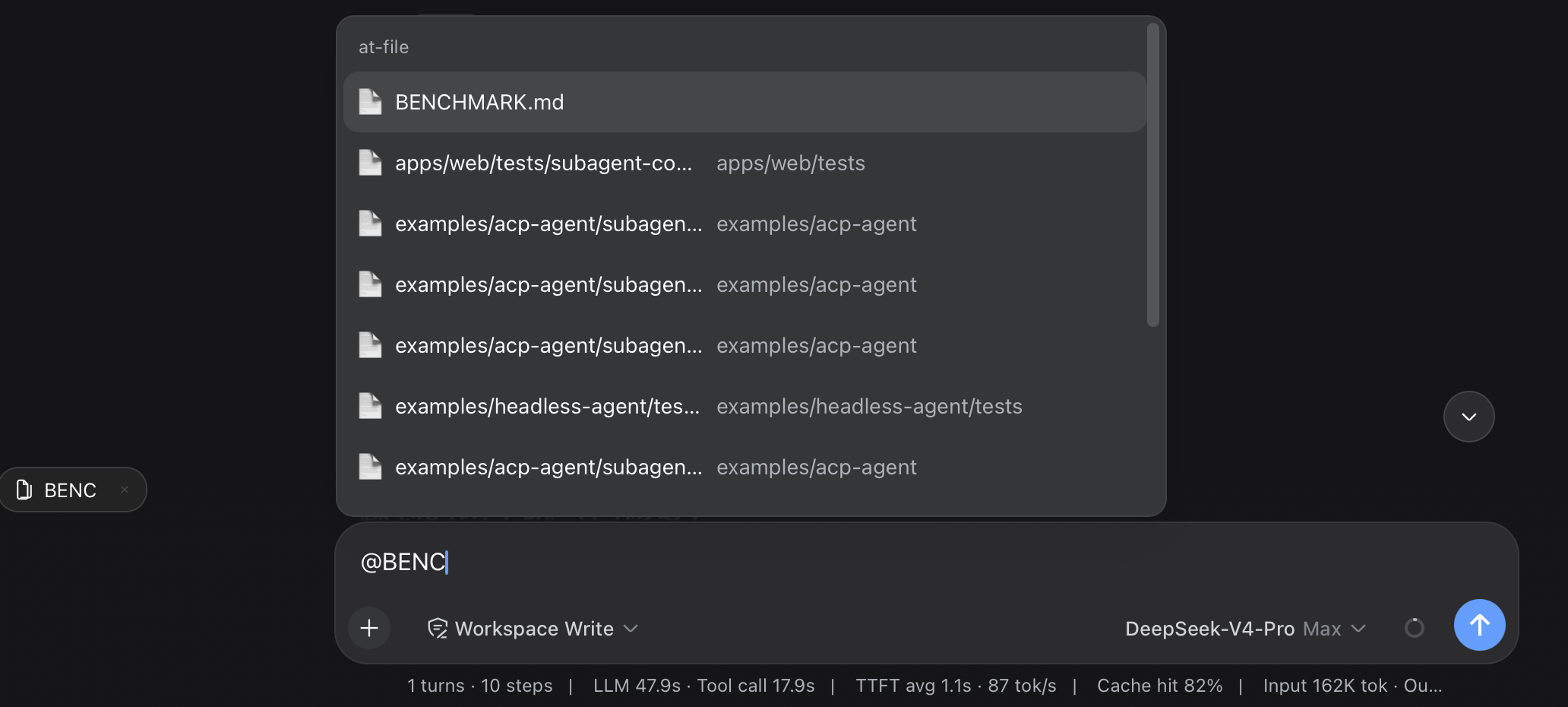
About this plugin
Source snapshot 8/13/2026dsh-at-file
Codex-style @file mentions for the DeepSeek Harness web GUI. Type @ in the composer, search the workspace files (and directories) as you type, press Enter to attach, and the referenced content ships to the model when the message is sent.
composer:  fix the README  @README.  ← floating picker over the token
            ┌────────────────────────────┐
            │ 📄 README.md               │
            │ 📁 docs/                   │
            └────────────────────────────┘
draft:     fix the README @README.md     ← a readable plain-text token
dock:      📄 README.md  ×               ← clickable link above the input
model:     <file path="README.md">…content…</file>   ← injected at send time
The draft keeps the plain-text @path token (no chip, no overflow); the Host expands it into the file content at each agent's pre-step boundary. Attaching a directory expands to every file under it, recursively and bounded.
Install
dsh plugin --profile web add https://github.com/omdsh-dev/dsh-at-file/archive/refs/heads/main.tar.gz
Restart the web server so the host half and the served client bundle pick up the plugin. The plugin needs the standard web bundle composition (the ui-input-trigger @ pipeline, api-gateway client Remote, and the conversation slots) — the default dsh web profile has all of them.
The enable switch lives in Settings → File mentions (at-file settings namespace, exposed by a one-line harness allowlist entry).
Configuration
Host-side tunables live on the plugin row in cordis.yml:
- id: dsh-at-file
  name: dsh-at-file
  config:
    maxIndexedFiles: 5000      # hard cap on indexed entries per workspace (walk stops, reports truncation)
    maxFileBytes: 262144       # hard cap on one attached file; larger files are refused, never truncated
    ignoreDirs: ['.git', 'node_modules']   # directory basenames the walk skips
Model experience
| Aspect | Effect |
|---|---|
| Token cost | One attached file adds its complete content (up to maxFileBytes) to the request; a directory adds each subtree file. |
| Tool calls | None — the content is already in the prompt; the model never calls a tool to read attached files. |
| Message format | Each file serializes as <file path="<workspace-relative>">\n<content>\n</file>; a directory as <directory path="…">…</directory>; injected as a user-role message with source at-file-mention. |
| Limits | Files over maxFileBytes, binary files, or paths escaping the workspace are skipped (the mention stays plain prose). |
Permission boundary
- The picker only offers entries under the session's workspace (
.git/node_modulesskipped by default). The Host resolves@pathtokens against the session's cwd and never follows..out of the workspace. Content expansion happens Host-side at theagent/pre-stepboundary, only forsource.kind === 'user'messages. host.openPath(the click-to-open action) is the harness's own loopback-pinned endpoint.
Development
pnpm install            # links the sibling dsh checkout for build and tests
pnpm run check          # typecheck + tests + build
pnpm run test           # vitest (host fs/mention/runtime, client source/dock/section/apply)
pnpm run build          # esbuild host/client/invariant bundles + tsc declarations
The repo expects the harness checkout at ../dsh for the dev-time link: resolutions and the test aliases.
Known limitations
- The workspace index is cached per session for 30 seconds; files created later appear on the next menu open after that window.
@pathtokens may not contain whitespace or@(the token grammar is@[^\s@]+); a filename with spaces cannot be mentioned by typing.- The picker group title renders the source name (
at-file) because the slash menu's title dictionary is owned by the harness.
License
MIT
Related DeepSeek Harness Plugins
Browse Developer Tools →
一个侧边栏的完整工作台,支持三方拓展注册新Tab页面,内置文件渲染编辑/终端/Git/子代理

DSH Web 鲸鱼娘皮肤系列(深海女仆工坊 maid-atelier)——CC BY-NC-SA 4.0

Extensible macOS workbench for DeepSeek Harness with a native PTY, workspace tools, live bilingual plugins, and an isolated-preview plugin marketplace.

Open DeepSeek Harness workspace directories in VS Code directly from the web GUI.